
Formatting tags
SNAP replaces these tags with values from the WordPress post when it prepares the message.
| Tag | Inserts |
|---|---|
%TITLE% | Post title |
%URL% | Post URL |
%SURL% | Shortened post URL, using your configured shortener |
%SLUG% | Post URL slug |
%IMG% | Featured-image URL |
%EXCERPT% | Processed excerpt |
%RAWEXCERPT% | Excerpt as entered |
%ANNOUNCE% | Text before the <!--more--> marker, or the configured opening words |
%FULLTEXT% | Processed post body |
%RAWTEXT% | Post body as entered |
%ORID% | Original WordPress post ID |
%TAGS% | Post tags |
%CATS% | Post categories |
%HTAGS% | Post tags as hashtags |
%HCATS% | Post categories as hashtags |
%AUTHORNAME% | Author name |
%AUTHOREMAIL% | Author email address |
%AUTHORTWNAME% | Author’s Twitter username from the user settings |
%SITENAME% | Site name |
%POSTFORMAT% | WordPress post format |
%CF-CustomFieldName% | Value of the named custom field |
%CT-CustomTaxonomyName% | Terms in the named custom taxonomy |
%HCT-CustomTaxonomyName% | Terms in the named custom taxonomy as hashtags |
A short social update
%TITLE% - %URL%
%HTAGS%
Set the default message format in each account’s settings. You can also edit the message for an individual post.
HTML content
For destinations and post types that accept HTML, such as Blogger or LiveJournal, you can include the image URL inside an HTML image element. Use plain text for destinations that do not support HTML.
<p>New post: <a href="%URL%">%TITLE%</a></p>
<p><img src="%IMG%" alt="%TITLE%"></p>
<p>%EXCERPT%</p>
WooCommerce product price
On sale now: %TITLE% - $%CF-_price% - %URL%The custom-field tag reads _price from the product. Adjust the currency text to match your shop.
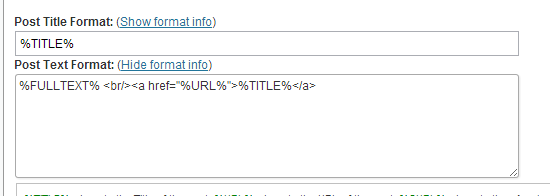
Blogger example
An example of a product message rendered in a blog destination.
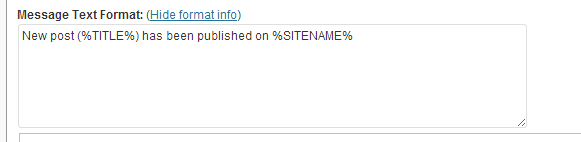
Facebook example
The same product information in a shorter social message.
Custom fields and taxonomies
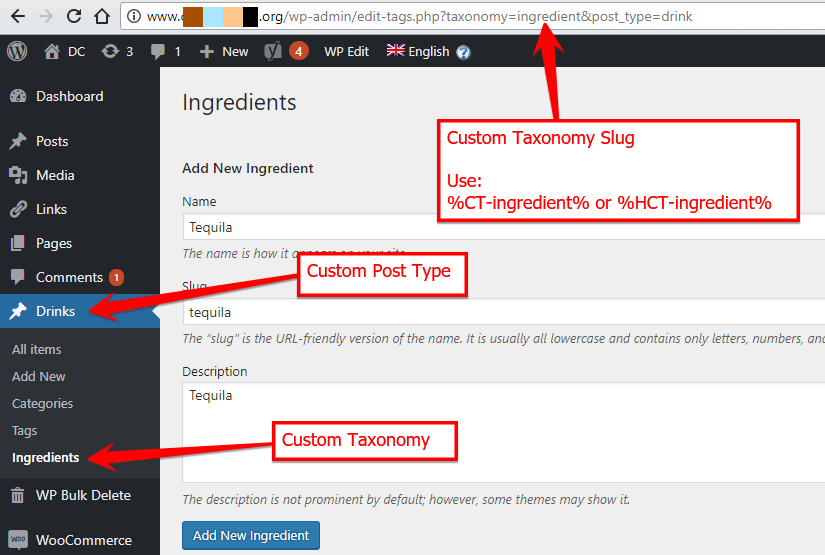
Use %CF-PRDPRICE% to read a field named PRDPRICE. Replace CustomTaxonomyName with the taxonomy’s registered name in %CT-CustomTaxonomyName% or %HCT-CustomTaxonomyName%.
Custom taxonomy example
Choose the taxonomy name used by your site, rather than its display label.
Check the final message
Preview or test with a real post. Expanded titles, excerpts, custom fields, and hashtags change the final length. Check formatting and links on the destination network.
