
Facebook recently has made a change to shared link thumbnail image size. The whole layout of the share has been changed as well. The big image is now located under the text, not in the left column.
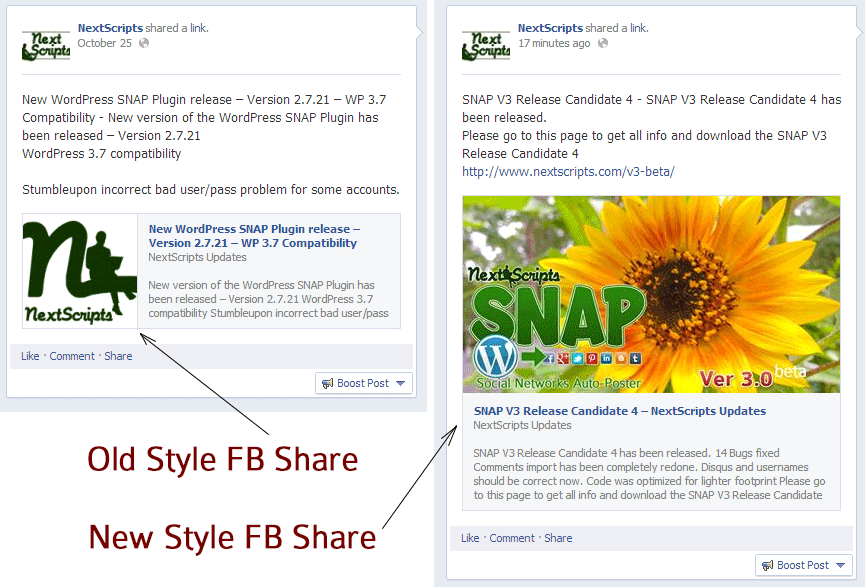
While this new layout yet to be transitioned to the regular API shares, there is a way to make this happen right now. Version 3 has an option to let Facebook decide the share info by itself using your OG tags and other info.
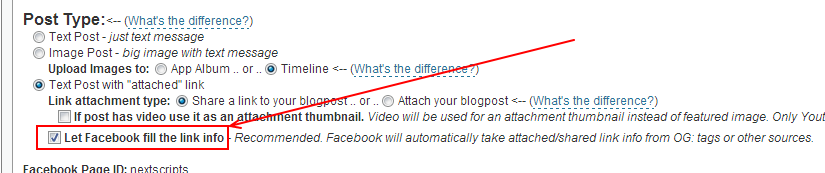
If you check this option and your image is up to the specifications Facebook will make your share presented in the new layout. The recommended og:image size for this feature is 1200x627px, minimum is 560x292px.
Update: Version 3.0 has been released.
Update 2 (January 2014): New layout is available to all types of Facebook shares including API shares.
If you don’t see the big thumbnail then your link doesn’t meet the Facebook requirements for big thumbnails.
There are several:
– link MUST be shared, not attached.
– page must have og: meta tags.
– og:image meta tag must be set and contain the correct image URL.
– size of the image listed in og:image meta tag should be minimum is 560x292px, recommended 1200x627px.
Live example – Embeded autoshare of this exact post:

Good news. I’ve found this format to have the best results for auto posting. Mainly because the images do not get uploaded to facebook which helps lead traffic away from facebook, and it also includes the view counts and boost post features.
#Tumblr is still our favorite. 😉
Dosnt work for me 🙁 when share same post manually its work
Please recheck the list of requirements.
The thing about this feature, that it’s not possible for it to “doesn’t work”. If you read the post you see that this feature possible only if you check “Let Facebook fill the link info” checkbox. This basically means that if this checkbox is set plugin does NOTHING. It just tells the the Facebook – “Here is the URL to share – do whatever you like with it”. There is noting else. Nothing could be broken, nothing for us to fix.
Hello!
It is doesn’t work in Facebook groups! It is work in facebook page.
Help me!
Thank you very much!
It does work with Facebook groups. What exactly doesn’t work for you? Are you getting any errors? Please check your Log/History tab and let me know if you have any errors there.
Hi
Its working but small image size
In page we can see it bigger size, when in coming to facebook feeds, image showing small size.
Please help
india-am2pm.com
Please read the article carefully. Everything stated there is important.
Article says:
Your site:
<meta property="og:image" content="http://india-am2pm.com/wp-content/uploads/2013/12/v55BjXogrYVl-300x200.jpg" /><meta property="og:image:width" content="300" />
<meta property="og:image:height" content="200" />
this is having a strange issue. I tried posting like this and no doubt it work .. It post large images on my facebook page but the news feed of users still show small image format .. any help ???
I have exactly the same issue.
NExtscripts guys please can u provide an update .. my site meets all requirements but comei ng to feed why does it show small images format
its showing large thumbnails on me.. https://www.facebook.com/download8now
The big image size is ok when you look at the facebook page but not in the user timeline, any idea?
Thanks.
Hello!
It is doesn’t work in Facebook groups! It is work in facebook page.
I have the same problem.Large picture on my Fb Page and a small one on others new feed. Help Please.
I wonder what we are supposed to do with portrait oriented images? Due to this harebrained Facebook initiative, it is now full of badly cropped, horrible-looking thumbnails. Sometimes you can’t even tell what they are!
Unfortunately I dont get answered my support ticket so I ask here again:
– Facebook Debuger says everything is fine with my OG Tags.
– My images are big enough.
– Link is shared, not attached.
– OG:Image Tag contains the right picture
–> But no big share image on Facebook. Just the small rectangle. When I put manually the link on Facebook the big image appears.
When it is not your plugin what could it be else?? Please help. Dont find an answer here.
http://www.inspiration-now.com
Can I see the post made by the plugin on your Facebook page?
For example:
http://www.inspiration-now.com/control-room-roxy-paine/
This is my ticket number #345056. It is already 2 weeks old.
Here the screenshot from the posting in the timeline:
http://inspiration-now.com/control.png
On my facebook page they are all with a big thumbnail.
When I post the link manually the post gets a big thumbnail in timeline, too.
Please reply … I’ve payed for this plugin.
Still found no solution here. I’m reliant to your help. Cant figure it out.
I’m having trouble, too. (WordPress site) My image is big enough, I have bypassed the Featured Image by selecting the larger photo in the actual post.
This is in the header of my site (my URL is correct in the live version):
Do I have to add og tags in the actual post pointed exactly to the image for every post?
Thanks be to all!
Yes, you do need to have the correct og:image tag in every post
Okay but where do I add this in the post? I’ve tried everything exactly as you have it but my Facebook page won’t show the larger photo. This just isn’t working :-(. Is there a step by step for adding in these tags to a post and/or to a theme?
Is there anyone to help me for a small fee? ;-). Thanks!
I have the most recent version of the plugin. 3.3.4 but there is no checkbox like the one described here. Nothing that says “Let Facebook fill the link info.”
What’s up?
It’s not possible.
Can you send me a screenshot of your plugin Facebook settings?
You can send screenshot to support@nextscripts.com or just paste it to http://snag.gy/ and give me the link to it.
Hi,
Can someone tell us where to access this “post type” setting “let Facebook fill the link info setting….” Thanks.
Please see here:
I am having great difficulty. I have tried everything. Basically the big image attaches but it doesnt generate a link to the blogpost. It just shows the image on facebook exactly how it would look if I manually uploaded a picture on facebook. Is there a fix for this?
Thankyou
Fix? Please just change the post type from “Image Post” to “Text Post with Attached Link (Shared)”
if you tick “let Facebook fill the link info”, the post only will show my website picture. Can you teach me how to do?
The answer is here https://www.nextscripts.com/snap-features/how-snap-sets-images/
This works for a youtube link??
yes it does
Is it possible to define “how much” of the blog post text that should be posted under the image? My issue is that I have an embeded youtube video in my post, and I don’t want the URL to be posted as “raw text”. But thats what happens now.
The answer is in the FAQ – #4.11:
https://www.nextscripts.com/support-faq/#q411
I have a post with a youtube video.
It works perfectly for all the options, BUT when I select “If post has video use it as an attachement thumbnail” it does post on facebook BUT with NO image…
For all the other options works fine.
Any ideas?
Here: https://wordpress.org/support/topic/thumbnail-for-videos-gone?replies=2