
SNAP DOCUMENTATION
Facebook Posts with Attached Link
Facebook Post
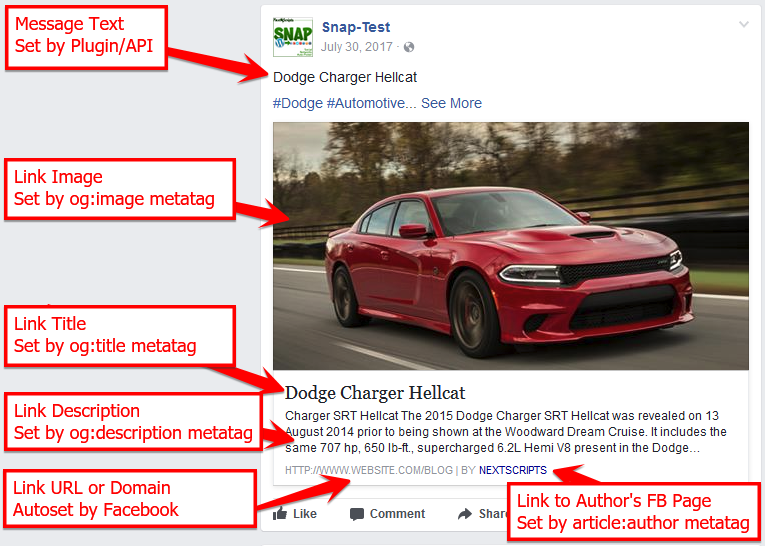
How Facebook fills link preview info
Only the top part of the post (Message text) is created and formatted by SNAP.
The rest of the info is formed by Facebook itself using your Open Graph (OG) metatags. There is no way to adjust that info via SNAP. You need to adjust Open Graph (OG) metatags for that.
Here is how it works:
1. You hit a “Publish” button. WordPress changes the status of the post to “published” and calls the special hook from SNAP attached to that event.
2. SNAP contacts Facebook and says “Hi Facebook. Here the URL of the link I want to publish on my Facebook account (page).
3. Facebook visits the provided URL, collects title, description and image from OG metatags and than publishes the link with collected from OG tags title, description and image.
SNAP plugin is NOT involved in the step #3. It’s between your site and Facebook.
Facebook uses OG metatags from your page to fill the preview info. If there are no OG tags, it will use regular metatags and/or just info from your website that it decide is appropriate.
Image – <meta property=”og:image” OR the first available image in the HTML text.
Title – <meta property=”og:title” OR <title> … </title>
Description – <meta property=”og:description” OR <meta name=”description”
There are many WordPress plugins that could add opengraph tags on your site: https://wordpress.org/plugins/tags/open-graph/