
Changes to SNAP Pro for Wordpress Promotion offer
Promotion offer Changes
We are no longer offering downloadable Google+ and Pinterest APIs along with WordPress Plugin.
We had this promotion offer for quite some time. Two downloadable API libraries were included with SNAP Pro WordPress plugin purchase.
Today we are replacing this offer with something much better. From now on SNAP Pro WordPress plugin comes with built-in run-time edition of SNAP Universal API. SNAP Universal API adds not just Google+ and Pinterest, but 10 additional networks otherwise not available for autoposting in any form or significantly improved over the original APIs.
Platforms/Social Networks based on the unique NextScripts SNAP API:
1. Blogger/Blogspot – Post to your Blog. HTML is supported.
2. Deviantart.com – Post to your blog. HTML is supported.
3. Flipboard – Post to your magazine.
4. Google+ – Post to your profile, business page or community. Ability to attach a link to Google+ post. Ability to make “Image” posts.
5. LinkedIn – Unique ability to Post to LinkedIn Company pages
6. Pinterest – Pin your blogpost’s featured image to your Pinterest board.
7. Reddit – post to your subreddits.
8. vBulletin – Auto-submit your blogpost to vBulletin forums. Could create new threads or new posts.
9. vKontakte(VK.com) – Post to your profile or group page. Ability to attach link to vk.com post. Ability to make “Image” posts.
10. YouTube – Post messages to your YouTube channel feed. Ability to attach videos to posts.
PS: If you need downloadable Google+ and Pinterest APIs, they are now the part of our SNAP Universal API (Light and Pro Editions are downloadable). And guess what? SNAP Pro WordPress plugin is included for free with every Light or Pro SNAP Universal API purchase.
PS2: This change is effective today, May 1st 2014. If you find our old ad somewhere, the old “3in1” promotion there is no longer valid.
PS3: We are no longer offering separate downloadable Google+ and Pinterest APIs to the new customers. We simply don’t have and don’t support those two files anymore. All up-to-date APIs including Google+ and Pinterest are available only in the SNAP Universal API.
What happened with what I have now? Does it mean I should re-purchase?
1. Nothing will be changed for you if you are using WordPress Plugin (actually it will be even better). It will work with SNAP Runtime API indefinitely. SNAP Runtime API is embded in the “Pro” plugin.
2. Downloadable Google+ and Pinterest API libraries (that were included for free with SNAP Pro Plugin order) are discontinued. Those files will be kept up to date till the May 2015 after that they will stop working right after Google and/or Pinterest make any breaking changes to it’s interfaces. Those libraries should be replaced with SNAP API before that.
3. Universal SNAP API. New product that includes API to Google+, Pinterest and all other networks (free and not free). SNAP API comes as a yearly subscription. If you purchased “SNAP Pro WordPress plugin with Google+ and Pinterest API libraries for $49.95” within a year of upgrade, you can get a $49.95 discount for your first year.
Old Posts Re-posting is no longer supported.
We introduced the “Old Posts Re-posting” functionality with version 3.0. It was one of the most requested features and it was one of the most hardest features to implement.
What we did works, but it turned out to be very hard to understand and configure correctly. You need to setup the re-poster itself, then you need to include/exclude posts to/from re-posting based on several different criteria. It’s complicated and hard to get. It should be much more clear and easy to use.
It’s time to admit that we did it wrong.
So we officially announce that we will completely re-do the “Old Posts Re-posting” feature in the version 3.5 release. Until then, starting from March 25, 2014, we are no longer offering support for the current implementation. There is no point in fixing it, it must be completely re-done.
If you still want to try to use it please see the instructions and troubleshooting
We are sorry, but we are longer accepting or replying to support tickets/inquires about “Old Posts Re-posting”. This functionality is now provided “as is” without any guarantees.
The good news is that we actually got a lot of feedback and a lot of experience from this. We know what we did wrong, and what to do to improve it. We promise that we will do it right this time.
PS: Just to clarify. “Old Posts Re-posting” functionality is not buggy, it’s not broken, there is nothing wrong with it as it’s done. You can configure it and it will work. It’s just very confusing and hard to understand and configure. Also it is not as flexible as it should be and many desired configurations are either extremely hard to achieve or even impossible. It should not be like this.
Update (Dec 2014): Upcoming Version 4 Features: Auto-Reposting
Update 2 (March 2015) (FAQ)
Question:I got “Pro” version and it says that this is not supported. I urgently need this functionality!!!
Answer We are not sure what exactly are you asking here. First of all “Re-posting” is not a part of “Pro” upgrade, it’s available in the free version. Re-posting functionality in V3 is working, we just don’t support it because it was not implemented to satisfy everyone and we are completely redoing it. We are working on new re-posing functionality for the last 10 months. It will take another 2-4 months to finish it. What exactly can we “urgently” provide you with?
Troubles with WP Cron and existing posts auto-reposter
“Existing posts auto-reposter” functionality will be disabled if WP Cron is not configured correctly.
It’s been more then three months since we released SNAP for WordPress Version 3.0 with “Existing posts auto-reposter” functionality. It was one of the most requested features and a lot of people are enjoying it. However this feature brought a lot of troubles to us.
The problem is that this feature could work properly only with correctly configured (healthy) WP Cron. It turned out that a lot of people have no idea what is “WP Cron”, how does it work, and why it’s important to keep it healthy.
Combination of unhealthy WP Cron and “Existing posts auto-reposter” feature could cause: no auto-repostings, no auto-postings, many duplicate postings and repostings, site crashes, 500 Internal server errors, etc … and of course we are getting the blame for all those problems.
We don’t feel that we deserve all those bad reviews and being called “Unhelpful Support” simply because we don’t have technical capabilities to spend hours on each website debugging WP Cron. WP Cron is a part of WordPress itself and its absolutely not related to our products. Healthy WP Cron is a requirement for “Existing posts auto-reposter” functionality and SNAP for WordPress Version 3.3 will check and disable this feature if it detects that WP Cron is not configured the way it should be.
Please go to the “Help/Support” tab and click “Show Cron Test Results” to see how your WP Cron is doing.
We have a very good tutorial about correct configuration of WP Cron: WP-Cron: Scheduling Tasks in WordPress
Once the WP Cron is configured correctly, please go to the Help/Support tab again and click “Show Cron Test Results” and then click “Re-do Cron Check”.
“Existing posts auto-reposter” functionality will be reactivated after successful test.
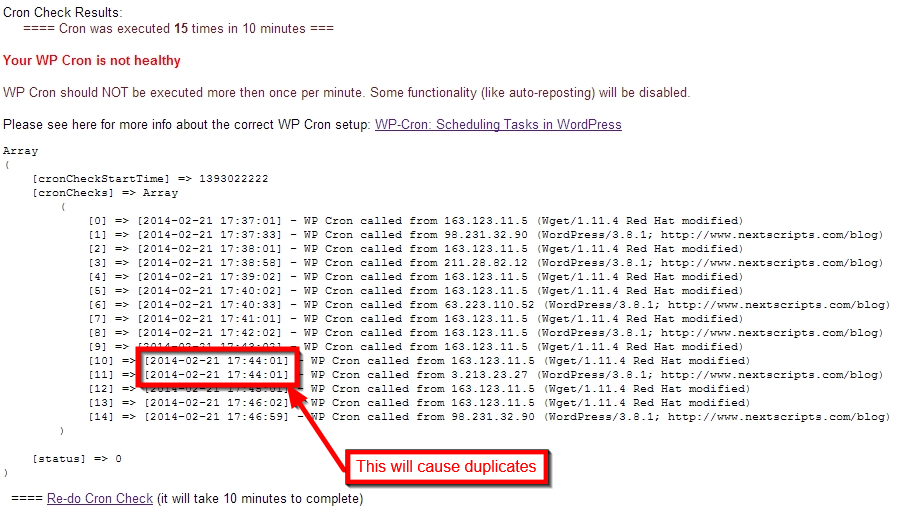
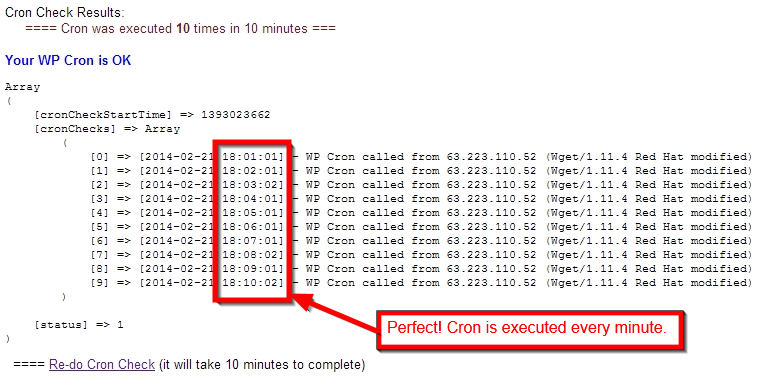
We are really sorry, but we can’t offer troubleshooting services for WP Cron as part of our support for SNAP plugin. This is a server administration issue, so please work with your server admin or hosting provider if you need help setting it up correctly.
UPDATE: Yes, you can force “Auto-Reposter” back on from the settings tab.
New non-numeric "custom" URLs for Google+ pages.
Google is actively rolling out non-numeric “custom” URLs for it’s users and pages.
yes, we’ve got one too: https://google.com/+Nextscripts
This +NextScripts is not our page ID and it cannot be used in our API.
Here is how to get the numeric page ID:
1. Login to your account, go to “pages” and select your page.
2. You will see the front of your page with the new URL. Click “Manage this page” button.

3. You will get to the dashboard and dashboard will show the numeric ID in the URL.

Alternately you can just click “Manage this page” right from the pages selection.
Facebook new [bigger] shared link thumbnail images
Facebook recently has made a change to shared link thumbnail image size. The whole layout of the share has been changed as well. The big image is now located under the text, not in the left column.
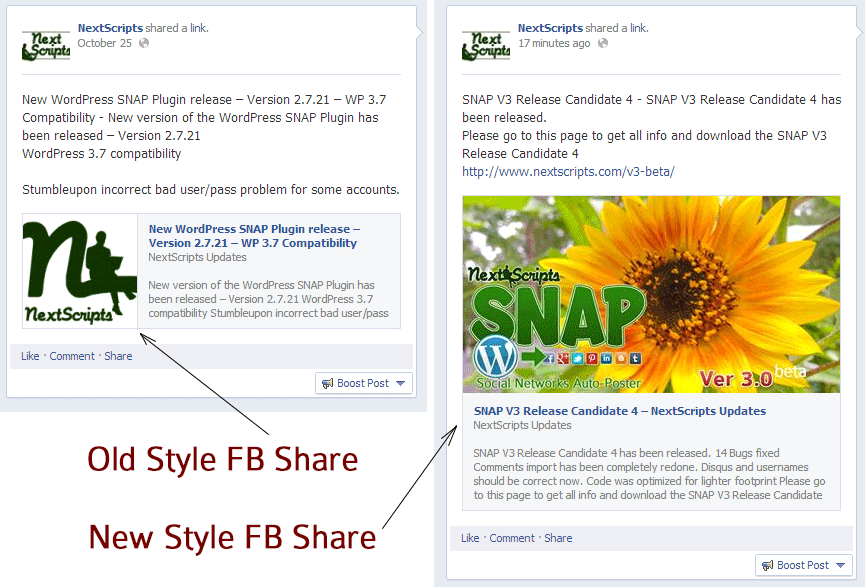
While this new layout yet to be transitioned to the regular API shares, there is a way to make this happen right now. Version 3 has an option to let Facebook decide the share info by itself using your OG tags and other info.
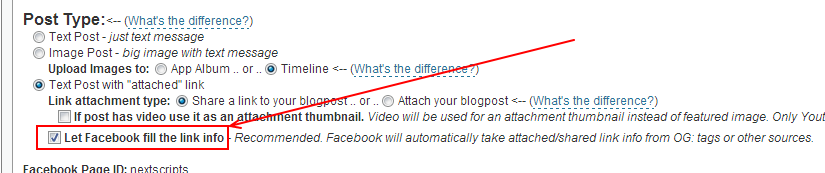
If you check this option and your image is up to the specifications Facebook will make your share presented in the new layout. The recommended og:image size for this feature is 1200x627px, minimum is 560x292px.
Update: Version 3.0 has been released.
Update 2 (January 2014): New layout is available to all types of Facebook shares including API shares.
If you don’t see the big thumbnail then your link doesn’t meet the Facebook requirements for big thumbnails.
There are several:
– link MUST be shared, not attached.
– page must have og: meta tags.
– og:image meta tag must be set and contain the correct image URL.
– size of the image listed in og:image meta tag should be minimum is 560x292px, recommended 1200x627px.
Live example – Embeded autoshare of this exact post:
Autoposting to Instagram
Yes, we do aware that Instagram is quickly becoming the next “Big thing”.
Instagram does not allow uploading from any other source then it’s own Phone App. We can hijack that, but they will find out and ban/disable/deactivate/suspend your account very quickly.
You can see their statemnt about third party uploading here: https://instagram.com/developer/endpoints/media/
At this time, uploading via the API is not possible. We made a conscious choice not to add this for the following reasons:
– Instagram is about your life on the go – we hope to encourage photos from within the app. However, in the future we may give whitelist access to individual apps on a case by case basis.
– We want to fight spam & low quality photos. Once we allow uploading from other sources, it’s harder to control what comes into the Instagram ecosystem. All this being said, we’re working on ways to ensure users have a consistent and high-quality experience on our platform.
Again, any upload that was not made from mobile phone is automatically considered as spam there and will lead to immediate suspension of your account.
We will add Instagram to SNAP as soon as they change this policy. We encourage you to contact them and ask about that change.
UPDATE (AUG 2015) regarding Hootsuite and Instagram integration
Hootsuite just made a very loud announcement that you can publish to Instagram from it. As a result we are getting a lot of questions about why can’t we do the same. Well, as usual, the devil is in the details. Here is how the “new” Hootsuite -< Instagram publishing feature works:
1. You install Hootsuite app on your phone.
2. You make or schedule a new post from Hootsuite website.
3. When it’s time to post Hootsuite app on your phone will send you a “push” notification that will appear on your lock screen for couple seconds.
That’s it. Nothing else. All you got is the message on your lock screen from Hootsuite app.
Why? What do you mean “that’s it”? What about Instagram???
Oh. Right. Here is what you need to do next.
1. Get your phone out of your pocket.
2. See the notification from Hootsuite and tap it. Hootsuite app will open.
3. Tap “Open in Instagram” button. Instagram app will be opened with your image pre-loaded.
4. Hold over the caption area and paste the text from Hootsuite app to Instagram app.
5. Tap “Publish”.
So “Automatic publishing” actually involves 5 manual steps that you need to repeat every time. Basically all that Hootsuite does is – it saves your image on your phone and reminds you that it’s time to manually post it.
See us on the Facebook:
NextScripts API: New Social Network - Reddit
Many people mentioned in the comments to the previous post, that Reddit allows you to post your own links to your own subreddits.
Well, we have heard you and the next version of the SNAP will support autoposting to Reddit.
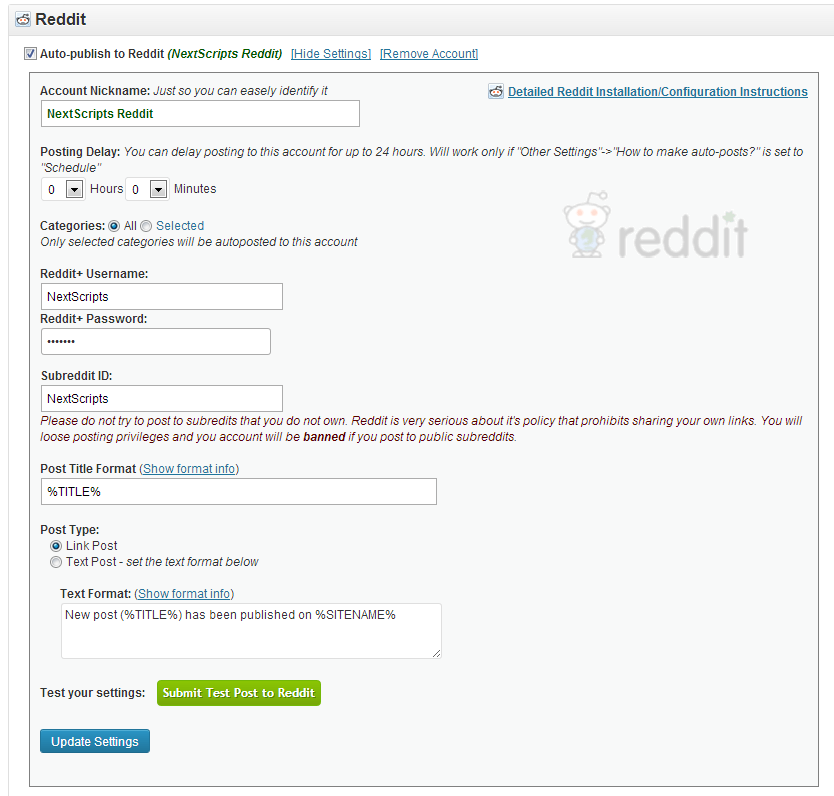
You can check out our subreddit: https://www.reddit.com/r/NextScripts/
Digg and Reddit
We are getting a lot of requests to add Digg and Reddit to our list of supported networks.
1. Digg. As you may notice old Digg (that allowed anyone to share links) is not here anymore. New Digg it still undergoing development and has no API and no way to submit new links using their own accounts. They don’t even allow their accounts to be created yet. We are monitoring the development, and we may consider adding it as soon as their system allow it in any way.
2. Reddit. Technically we can add reddit, but it’s basically useless. Reddit does not allow you to post your own links (and they force this policy):
https://www.reddit.com/wiki/faq
What constitutes spam?
If your contribution to reddit consists mostly of submitting links to a site(s) that you own or otherwise benefit from in some way, and additionally if you do not participate in discussion, or reply to peoples questions, regardless of how many upvotes your submissions get, you are a spammer. *****If over 10% of your submissions are your own site/content, you’re almost certainly a spammer.*****
Update: Reddit actually allows autoposting to your own subreddits, so next version will be able to autopost to Reddit
.
We are going into the "all hands" development mode for the next two weeks
We are going into the “all hands” development mode starting tomorrow an going till the Apr 15. We will be making version 3.0. We want to reinvent the SNAP for the third time and make it faster, simpler and more efficient. We will also add a lot of cool features in a process.
Some of the features we are considering:
Ability to scheduled auto-posts for the specific time.
Ability to add auto-posts to the query that will be posted according to some specified rules (like “two posts per hour”).
Ability to auto-post already existing posts
Ability to auto-repost existing and already posted posts based on some rules (one-by-one, random, from specific days, etc..)
Ability to make multi-image posts to Facebook and Google+
Ability to select what image to use for “Image” and “Attachment” post types if post has several images
Support for each user to be able to setup and autopost to his/her own accounts
Important notice: We will concentrate on development and we will be much less available for support during this time. The current version 2.7.8 is very stable, has been thoroughly tested and has no major bugs. 85% of support tickets we are getting now are already answered in the FAQ. Please check the FAQ page, installation instructions, “Pro” update instructions and contact us only if you don;t find the answer there. Although response time will be much longer then usual.
Important notice #2: Our plugin comes with free upgrades for lifetime. Version 3.0 will be free upgrade. All settings and configured networks from previous versions will be auto-imported to 3.0 without any actions from you.
Twitter: "Status contains malware" problem.
Twitter has blocked the whole gd.is URL Shortener. Please switch to some other URL shortener until that resolved. You can also upgrade to version 2.7.5 it has goo.gl as new default URL Shortener
[March 30, 2013] UPD: This issue has been resolved. Twitter is no longer blocking gd.is links.