
More Instagram Issues [Fixed]
Instagram made some additional changes to it’s infrastructure Feb 1-5. Those changes were causing some new errors and problems. Please see updated Instagram issues and how to fix them page for the fix instructions.
Instagram issues
Instagram made some very big changes to authentication process. About 70% of our users are affected by them.
Before the changes the process was quite simple:
Sometimes Instagram decided that login from SNAP is “unusual” and asked for confirmation. You just had to open Instagram on your phone and tap “This was me” button on “We have detected an unusual login attempt” screen.
The process become much more complicated now. Instagram is treating different accounts differently. Here is our analysis based on our user data:
- About 30% of accounts are not affected by the change at all. They work as they worked before.
- About 45% of accounts require to enter the code from email or SMS. SNAP supports this type of authentication starting from versions: SNAP Plugin 4.1.1 and SNAP API 4.0.37.
- About 15% of accounts require to enter the code from email or SMS and confirm the “unusual” location from the phone. SNAP supports this type of authentication starting from SNAP API 4.0.42.
You are in this category, if you saw this error:
{“message”: “login_required”, “logout_reason”: 3, “status”: “fail”}
Once you get API 4.0.42 update, SNAP will ask for code confirmation and then you will see the message:
You’ve got checkpoint! Please login to Instagram from your phone and confirm the login or action before trying to post again
Please open Instagram on your phone and confirm the the “unusual” location. SNAP will work fine after that.
- About 10% of accounts got demoted to the lowest trust status. You are here if you got an infinite loop of confirmations or empty errors. “Infinite loop” means that once you are successfully passed either code confirmation, you immediately asked to do that again. Please do not confuse “code infinite loop” that you might get with SNAP Plugin 4.1.1 and SNAP API 4.0.42 with “unusual” location infinite loop that almost everyone got before SNAP Plugin 4.1.1 and SNAP API 4.0.37.
There are two reasons for this: Your IP belongs to the hosting provider with the big number of abuse complains and/or your account got a lot of spam or abuse complains. About half of the accounts affected by “Infinite loop” or empty errors could be recovered using real mobile IPs. This means you MUST confirm your account location from the smartphone connected to the mobile network. Please disable WIFI and login to Instagram from LTE/4G/3G/EDGE network. Alternatively you can try to find “mobile” proxy.
Please see here for more detailed info about all recent Instagram problems: Instagram issues and how to fix them
[Update – February 6, 2018] Instagram made some additional changes to it’s infrastructure Feb 1-5. Those changes were causing some new errors and problems. Please see updated Instagram issues and how to fix them page for the fix instructions.
Are we done?
Instagram was acquired by Facebook 6 years ago. It looks like they finally started integrating Instagram in the Facebook infrastructure. It’s obviously a lot of work and a lot of changes, so new issues could appear or existing fixes could stop working. We will continue to watch the situation and release new updates once necessary.
If you have an issue that is not listed here or one of the fixes is not working, please check the Known Issues before opening a ticket.
Facebook is dropping support for manual setting of shared/attached links info
Update – July 21, 2017
In order to comply with new Facebook API, ability to manually set “shared link info” has been removed from SNAP Version 3.8.6. Also SNAP implementation of OG tags has been improved a bit, but we are still recommending to use more powerful solutions.
Here is the Facebook announcement – API Change Log: Modifying Link Previews
Facebook API 2.9 update came with deprecation of support for manual setting info of shared/attached links – Facebook API 2.9 Changelog

This is exactly the part of the Facebook API SNAP was using to set shared/attached links info when “Plugin/API” or “Set your own” option is selected in the “What should fill attachment info” field.

Facebook API 2.9 made those fields 90 days deprecated. That means all apps stopped posting that info on July 18, 2017.
The only option left is “Facebook” that uses OG metatags. Please set your OG metatags correctly. There are dozens of plugins that can do that.
XING Autoposting - New NextScripts Premium API
XING has recently decided to discontinue its official free API.
Today we are introducing the better alternative – new NextScripts Premium API for XING. Unlike the API from XING that was able to make posts to profiles only, NextScripts Premium API for XING can post to profiles, company pages, and groups.
All current API subscribers are getting it for free today. SNAP WordPress Pro plugin users can use it starting from version 3.7.16 (API 2.27.0). SNAP Pro API and SNAP Light API users should download package version 28 (API 2.27.0)

XING decided to discontinue it’s free public API
XING decided to discontinue it’s free public API.
Important information about xing public api support

We will release our own API for XING soon.
Update: XING Autoposting – New NextScripts Premium API has been released.
Autoposting to Instagram
Instagram Autoposting is coming to SNAP!
3 years ago we wrote an article explaining why Instagram was not supported. Instagram was accepting images only from the phones and other mobile devices and there was no way to post there from the website or API. Since then we were considering creating our own API for Instagram. Well, today we are announcing it.
NextScripts API for Instagram will be available for all active API subscribers* Friday March 5, 2016 as part of the Universal API.
More info as well as demo is here: SNAP: Autoposting to Instagram
Clarification:
Autoposting to Instagram is available to all active SNAP API subscribers. Active SNAP API subscriber is anyone whose last payment for SNAP API was less then a year ago.
Instagram autoposting is available in all SNAP API versions including “Pro”, “Light” and “Run-Time”(this one is included with “Pro” WordPress plugin)
Clarification #2: Who is getting Instagram?
SNAP API Pro Subscribers – Yes
SNAP API Light Subscribers – Yes
SNAP Pro WordPress plugin users who subscribed to RunTime API – Yes
SNAP Pro WordPress plugin users who chose “One time payment” option after March 5, 2015 – Yes (but will loose it on the payment anniversary)
SNAP Pro WordPress plugin users who chose “One time payment” option before March 5, 2015 – No
SNAP Free WordPress plugin – No
NextScripts SNAP and Yoast SEO
Nice people from Yoast added SNAP to the list of incompatible plugins without any additional explanation.
The following plugins might cause (open graph) issues with Yoast WordPress SEO: NextScripts: Social Networks Auto-Poster
Since there is no way to contact them, here is the explanation:
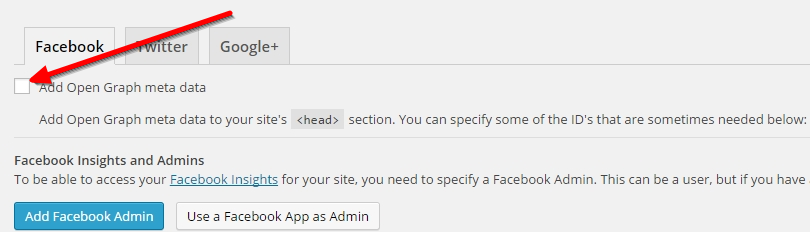
You can’t have more then one set of open graph tags on your site. Yoast SEO Plugin has an ability to add open graph tags on your site and SNAP can add open graph tags to your site as well. If you have both features active you will get two sets of open graph tags and that will confuse social networks that use open graph tags.
You need to disable open graph tags in one of the plugins.
You can disable open graph tags in SNAP in the settings tab:

You can disable open graph tags in Yoast SEO in the “Social” section:
UPD (Dec 3, 2014):
We reached out to Yoast, explained the situation and they agreed that there is no conflict between Yoast and SNAP: https://github.com/Yoast/wordpress-seo/issues/1796
Most Popular WordPress SEO and Social Media Plugins
Bestplugins.com made a nice infographic about most popular SEO and social media plugins. Please check the #5 in the “Social Media” section. 🙂

Solution for disappearing "Pro" features and "Incorrect Activation Key" error.
First off all we need to apologize to all the people who lost “Pro” features or got “Incorrect Activation Key” error during the last 8 hours.
Last night our server got corrupted in a bad way. What happened is when plugin checked for a version upgrade instead of “No/Here is a New Version” response server was returning a corrupted page. Plugin assumed it’s a new version – “Pro” functionality got corrupted. The same happened to the new “Pro” activation requests. Instead of “Pro” features server returned some corrupted page causing “Incorrect Activation Key” errors.
It’s all fixed now. Please re-enter your activation key and “Pro” will be back.
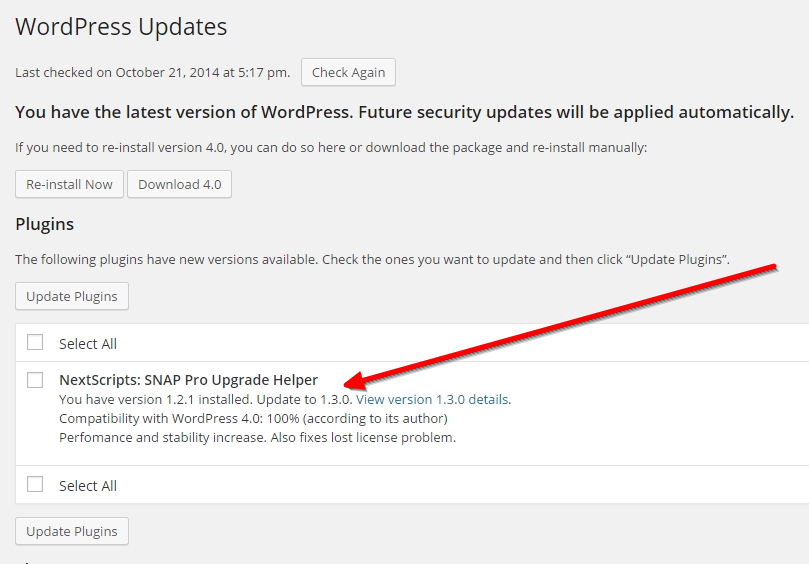
More then that, we made sure that this will never happened again. Please update “NextScripts: SNAP Pro Upgrade Helper” plugin to the latest version 1.3.3 that we just released. It should be available in your WP Admin -> Dashboards -> Updates section or you can get it from https://www.nextscripts.com/mypage
UPDATE: Issues like “Can’t upload images” and “Broken Media Manager” are also related to this.
SNAP Plugin for Wordpress - 1,000,000 downloads.
SNAP Plugin for WordPress just reached 1,000,000 downloads on wordpress.org. It happened today May, 11 2014 at 2:15 AM EST.

What can we say? Thank you! You guys are awesome! Thank you for using our plugin, thank you for your good reviews, thank you for your bad reviews, thank you for reporting bugs and problems, thank you for encouraging us to add more features and improve the product. Thank you for your support.
Also very special thank you to all people who bought the “Pro” update! We will keep working on it and we will keep adding new exiting features because of you.
PS: Yes, we know those are not unique downloads, this number counts upgrades as well.
PS2: Next 3 SNAP PRO Plugin for WordPress upgrade orders will be refunded, which means you will get it for free!
