
New Release: SNAP for Wordpress Version 3.1.0
SNAP for WordPress Version 3.1 has been released.
* New – WordPress 3.8 Compatibility
* New – New Ajax based settings page – 7 times lighter and faster.
* New – Filter autoposting by tags and custom taxonomies.
* New – Ability to set all posts “Enabled/Disabled for repost” according to the Categories/Tags/Custom Taxonomies filters
* Improvement – Performance/compatibility improvement with latest LastPass extension.
* Improvement – Better compatibility with SSL.
* Improvement/Bug Fix – HTML tags and shortcodes are now removed from Facebook attached titles.
* Improvement/Bug Fix – Compatibility with new LinkedIn security feature “We just sent you the code”.
More about New Features:
New Ajax based settings page with full WordPress 3.8 Compatibility
New settings page loads networks settings only when you need them. This makes it 7 times lighter and faster.

Filter autoposting by tags and custom taxonomies
Now you can filer your posts by Categories, Tags and custom taxonimies.
Only posts with those categories, tags or custom taxonomies assigned will be autoposted, you can include custom taxonomy tags in taxonomy_slug|tag format.

Please see more info and instructions here: Filer your posts by Categories, Tags or custom taxonimies
Ability to set all posts “Enabled/Disabled for repost” according to the Categories/Tags/Custom Taxonomies filters

In addition to the “Set all posts Enabled for Repost” and “Set all posts Disabledfor Repost” there is a new button [Enabled/Disabled for Repost according to Categories/Tags/Taxonomies filters]. This button will enable only the posts that belong to the categories/tags/taxonomies that set for autoposting.
See us on the Facebook:
New non-numeric "custom" URLs for Google+ pages.
Google is actively rolling out non-numeric “custom” URLs for it’s users and pages.
yes, we’ve got one too: https://google.com/+Nextscripts
This +NextScripts is not our page ID and it cannot be used in our API.
Here is how to get the numeric page ID:
1. Login to your account, go to “pages” and select your page.
2. You will see the front of your page with the new URL. Click “Manage this page” button.

3. You will get to the dashboard and dashboard will show the numeric ID in the URL.

Alternately you can just click “Manage this page” right from the pages selection.
New Release: Version 3.0.4
The long awaited version 3 has been released.
* New – Major release with a lot of new and improved features.
* New – Auto-repost existing and already posted posts based on some rules – one-by-one from old to new, one-by-one from new to old, from specific dates, “older then N days and younger then X days”.
* New – Add auto-posts to the query that will be posted according to some specified rules (like “two posts per hour”)
* New – Select what image to use for “Image” and “Attachment” post types if post has several images
* New – Custom URL for posts
* New – Reset all Settings for existing posts.
* New – Extended debug info.
* New – Ability to send errors by email.
* New – New Option – How to handle spaces in hashtags.
* Improvement – Comments import has been completely redone. Disqus and usernames should be correct now.
* Improvement – Code was optimized for lighter footprint
* New – App.net Support
* New – Reddit Support
* New – Deviantart Support
More about New Features.
Schedule auto-posts for the specific time
You can set a specific time when the post will go to the configured social network. This feature expands the existing “delayed postings” functionality.

Please see more info here: Schedule auto-posts for the specific time
Auto-repost existing and already posted posts based on some rules (one-by-one, random, from specific days, etc..)
This is actually two features in one.
1. You can use it to import all your existing posts one by one on specific schedule.
2. You can use it to recycle your old posts by reposting them (randomly or one by one) to your social accounts.

Please see more info and instructions here: Old Posts Auto-Reposting
Add auto-posts to the query that will be posted according to some specified rules (like “two posts per hour”)
This will be useful if you import RSS or other feeds to your site. Your posts are imported all at once, but will go social networks one by one with specified intervals.

Select what image to use for “Image” and “Attachment” post types if post has several images
You can select what image to use for autoposting if your post has several.
Short video demo of auto-posting to Google+ with selected images. Video shows that image selection is working for both “Image Posts” and for thumbnails for “Text Posts with “attached” blogpost”
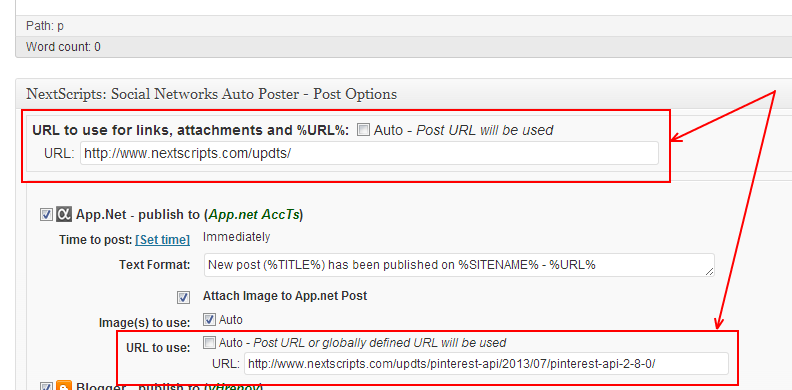
Custom URL for all networks and for each one individually.
New Networks
App.net, Reddit and deviantart.com will be added.
Demos:
https://alpha.app.net/nextscripts
https://www.reddit.com/r/NextScripts/
https://nextscripts.deviantart.com/journal/
See us on the Facebook:
Facebook new [bigger] shared link thumbnail images
Facebook recently has made a change to shared link thumbnail image size. The whole layout of the share has been changed as well. The big image is now located under the text, not in the left column.
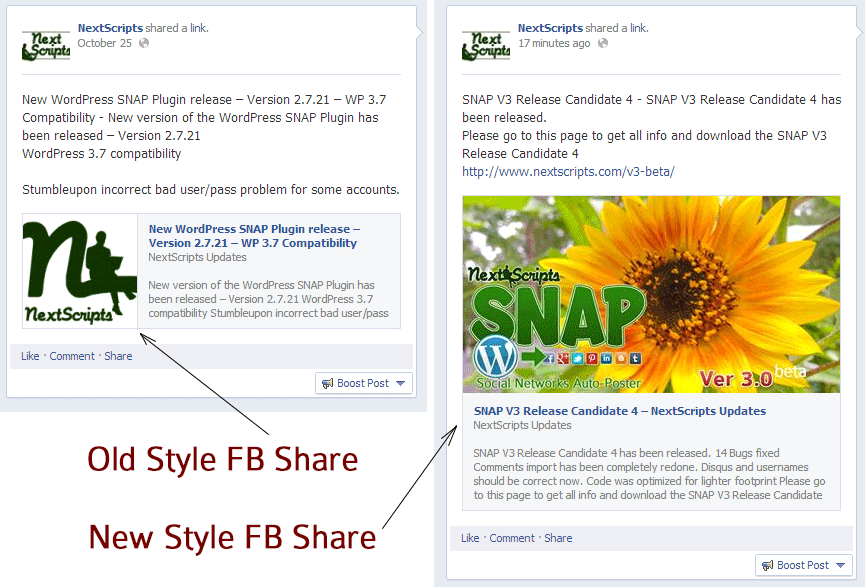
While this new layout yet to be transitioned to the regular API shares, there is a way to make this happen right now. Version 3 has an option to let Facebook decide the share info by itself using your OG tags and other info.
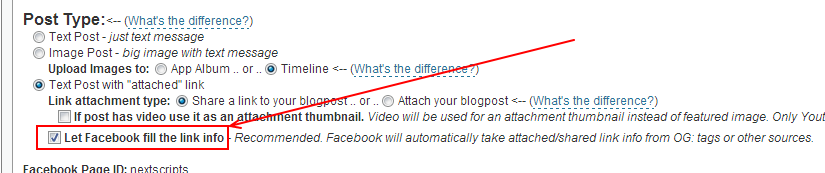
If you check this option and your image is up to the specifications Facebook will make your share presented in the new layout. The recommended og:image size for this feature is 1200x627px, minimum is 560x292px.
Update: Version 3.0 has been released.
Update 2 (January 2014): New layout is available to all types of Facebook shares including API shares.
If you don’t see the big thumbnail then your link doesn’t meet the Facebook requirements for big thumbnails.
There are several:
– link MUST be shared, not attached.
– page must have og: meta tags.
– og:image meta tag must be set and contain the correct image URL.
– size of the image listed in og:image meta tag should be minimum is 560x292px, recommended 1200x627px.
Live example – Embeded autoshare of this exact post:
SNAP Version 3 [Beta] Release Candidate 2 - Public Release
We have reached the point where we can offer SNAP Version 3 Beta to anyone. Product is already stable enough not to cause any major troubles. There will be no more new feature added, just some more bugfixes and then it will be released as “stable”.
First of all, thanks to all people who tested betas 1 – 6 and RC1 and provided us with valuable feedback. We made a lot of bug fixes and made some functionality changes based on your suggestions.
Now, you can take V3 Release Candidate 2 for testing. Please go to the SNAP V3 Beta download page.
New Features
New “Free” and “Pro” Features
– Auto-repost existing and already posted posts based on some rules – one-by-one from old to new, one-by-one from new to old, from specific dates, “older then N days and younger then X days”.
– Add auto-posts to the query that will be posted according to some specified rules (like “two posts per hour”)
– Select what image to use for “Image” and “Attachment” post types if post has several images
– App.net Support
– Custom URL for posts
“Pro” only Features.
– Schedule auto-post for the specific time
– Auto-repost existing random posts from from specific dates or “older then N days and younger then X days”.
– Limit random or one-by-one auto-reposting for specific days of the week and times. (like Monday-Friday from 8AM to 7PM Only)
– Reddit Support
New Release: Version 2.7.18
The new version 2.7.18 has been released.
It contains several improvements and fixes for recent changes in various social networks. Comments import issues and additional URL parameters issues has been fixed as well.
This will be the last 2.X.X release. Version 3 is almost ready.
Full list of changes since 2.7.14.
= 2.7.18 [09/04/2013] =
* Improvement/Bug Fix – Post to YouTube as Google+ page.
* Improvement/Bug Fix – Smiles are now posted to Facebook correctly.
* Improvement/Bug Fix – Support for VK.com phone verification.
* Improvement/Bug Fix – Additional URL parameters will be working for attached links as well.
* Bug Fix – Twitter Error – “Cannot use object of type WP_Error as array”
* Bug Fix – Facebook and Twitter comments with “Auto Approve” unchecked.
* Bug Fix – “Call to undefined function nxs_wp_allow_comment” error.
* Bug Fix – Facebook “[ERROR] couldn’t open file”
* Bug Fix – invalid shortcodes with %ANNOUNCE% tag
* Bug Fix – Incorrect international character count for Twitter.
= 2.7.17 [07/27/2013] =
* Improvement – If Facebook page has activated “Comments Reply” – replies will be imported to WP as actual replies
* Bug Fix – Facebook comments import wasn’t working automatically.
* Bug Fix – Facebook and Twitter comments imports weren’t working if the comments are duplicates
* Bug Fix – Twitter comments import wasn’t working because of API V1 retirement.
* Bug Fix – Twitter user image/avatar wasn’t working because of API V1 retirement.
* Bug Fix – Delay for Days wasn’t saving it’s status “Edit post” page.
* Bug Fix – Delay for Days wasn’t saving it’s status “Edit post” page.
* Bug Fix – StumbleUpon NSFW checkbox wasn’t saving it’s status “Edit post” page.
= 2.7.16 [07/19/2013] =
* Bug Fix – StumbleUpon connection fix.
* Bug Fix – StumbleUpon NSFW checkbox wasn’t working from the “Edit post” page.
= 2.7.15 [06/12/2013] =
* Bug Fix – Some Twitter functionality were not working because of Twitter V1 API retirement on June 11, 2013.
See us on the Facebook:
Autoposting to Instagram
Yes, we do aware that Instagram is quickly becoming the next “Big thing”.
Instagram does not allow uploading from any other source then it’s own Phone App. We can hijack that, but they will find out and ban/disable/deactivate/suspend your account very quickly.
You can see their statemnt about third party uploading here: https://instagram.com/developer/endpoints/media/
At this time, uploading via the API is not possible. We made a conscious choice not to add this for the following reasons:
– Instagram is about your life on the go – we hope to encourage photos from within the app. However, in the future we may give whitelist access to individual apps on a case by case basis.
– We want to fight spam & low quality photos. Once we allow uploading from other sources, it’s harder to control what comes into the Instagram ecosystem. All this being said, we’re working on ways to ensure users have a consistent and high-quality experience on our platform.
Again, any upload that was not made from mobile phone is automatically considered as spam there and will lead to immediate suspension of your account.
We will add Instagram to SNAP as soon as they change this policy. We encourage you to contact them and ask about that change.
UPDATE (AUG 2015) regarding Hootsuite and Instagram integration
Hootsuite just made a very loud announcement that you can publish to Instagram from it. As a result we are getting a lot of questions about why can’t we do the same. Well, as usual, the devil is in the details. Here is how the “new” Hootsuite -< Instagram publishing feature works:
1. You install Hootsuite app on your phone.
2. You make or schedule a new post from Hootsuite website.
3. When it’s time to post Hootsuite app on your phone will send you a “push” notification that will appear on your lock screen for couple seconds.
That’s it. Nothing else. All you got is the message on your lock screen from Hootsuite app.
Why? What do you mean “that’s it”? What about Instagram???
Oh. Right. Here is what you need to do next.
1. Get your phone out of your pocket.
2. See the notification from Hootsuite and tap it. Hootsuite app will open.
3. Tap “Open in Instagram” button. Instagram app will be opened with your image pre-loaded.
4. Hold over the caption area and paste the text from Hootsuite app to Instagram app.
5. Tap “Publish”.
So “Automatic publishing” actually involves 5 manual steps that you need to repeat every time. Basically all that Hootsuite does is – it saves your image on your phone and reminds you that it’s time to manually post it.
See us on the Facebook:
[Version 3] Some News
We have some news.
1. Version 3 Beta 4 wasn’t as bad as Beta 3 in terms of new bugs and problems. Beta 5 will be available on Monday to all beta testers and then most probably Beta 6 will be public.
2. New Version 3 feature.
Due to many requests we have added the ability to share some different URL with autoposts.
You will be able to setup custom URL for all networks and for each one individually.
3. We set a separate blog and social networks accounts for API updates announcements.
You can always see the latest release news here: https://www.nextscripts.com/updts/
Follow any of our special accounts to stay in touch with API releases, news and updates:
Twitter: https://twitter.com/NextScripts
Facebook: https://www.facebook.com/nextscripts
Google+: https://plus.google.com/u/0/114111009058659350987/posts
RSS: https://www.nextscripts.com/updts/feed/
4. One more thing. Pinterest is rolling out new interface to everyone. Old interface become obsolete and unstable. Starting with API 2.8.0 we are no longer support old Pinterest interface. Please login to your Pinterest account and accept new changes, otherwise you will be getting 502 errors.
Twitter V1 API retirement and SNAP version 2.7.15
While most of the plugin were written using new V1.1 Twitter API, one function were still partially dependent on old V1 API functionality. Twitter V1 API is now officially retired, so SNAP has stopped working for some people who were using that function.
We just released SNAP version 2.7.15. This version has all Twitter code updated to the latest V1.1 Twitter API and all functionality is working again as it suppose to. Please upgrade your plugin to this version.
[Version 3] New Features
Schedule auto-posts for the specific time
You can set a specific time when the post will go to the configured social network. This feature expands the existing “delayed postings” functionality.
Please see more info here: Schedule auto-posts for the specific time
Auto-repost existing and already posted posts based on some rules (one-by-one, random, from specific days, etc..)
This is actually two features in one.
1. You can use it to import all your existing posts one by one on specific schedule.
2. You can use it to recycle your old posts by reposting them (randomly or one by one) to your social accounts.
Please see more info and instructions here: Old Posts Auto-Reposting
Add auto-posts to the query that will be posted according to some specified rules (like “two posts per hour”)
This will be useful if you import RSS or other feeds to your site. Your posts are imported all at once, but will go social networks one by one with specified intervals.
Select what image to use for “Image” and “Attachment” post types if post has several images
You can select what image to use for autoposting if your post has several.
Short video demo of auto-posting to Google+ with selected images. Video shows that image selection is working for both “Image Posts” and for thumbnails for “Text Posts with “attached” blogpost”
New Networks
App.net, Reddit and deviantart.com will be added.
Demos:
https://alpha.app.net/nextscripts
https://www.reddit.com/r/NextScripts/
https://nextscripts.deviantart.com/journal/
Release Date
Version 3 will be released once we finish beta testing and work out all bugs.
Beta number 4 will be sent out next week. We will be taking more people for it. If you recently requested to become a beta tester, you should get it. If not you can still request it here: https://www.nextscripts.com/version-3-beta/
