
SNAP 4.3.23 Released [10/04/2021]: WordPress Site Health Fix & Footer Cleanup
SNAP 4.3.23 [10/04/2021] fixes an issue where the plugin interfered with the WordPress Site Health diagnostic tool and cleans up footer output.
Changelog for 4.3.23 [10/04/2021]
- Bug Fix: Message in the footer has been removed.
- Bug Fix: Fixed an issue where the plugin was breaking the WordPress "Site Health" section.
SNAP 4.3.21 Released [10/04/2021]: Favorite Accounts, Quick Post to Favorites & WordPress 5.8 Support
SNAP 4.3.21 [10/04/2021] introduces Favorite Accounts for faster publishing on sites with many connected social profiles, along with WordPress 5.8 support and several bug fixes.
Changelog for 4.3.21 [10/04/2021]
- New: Favorite accounts.
- New: Quick Post to favorite accounts.
- New/Improvement [WordPress Based Sites]: Ability to make an exact copy of the post.
- New: WordPress 5.8 support.
- Improvement: Support for hashtags with hyphens.
- Bug Fix [Blogger]: Fixed fatal error when an incorrect token was used.
- Bug Fix [vk.com]: Fixed outdated API error message.
- Bug Fix: Possible XSS security issue [WF-2021-09-29].
Automating Evergreen Blog Posts & WooCommerce Products with SNAP Auto-Reposter
Most blog posts and WooCommerce products only receive a fraction of their potential social traffic on the day they are first published. With SNAP's Auto-Reposter, you can put your existing content library to work automatically.
Best Practices for Evergreen Reposting
- Filter by Category, Tag, or Post Age: Only repost evergreen guides or active product categories that remain relevant year-round.
- Vary Your Message Templates: Use SNAP's Message Formatting Tags and spintax variations so recurring shares stay fresh.
SNAP 4.3.20 Released [02/05/2021]: Pinterest Session Support, Medium Integration Tokens & WP 5.6 Compatibility
SNAP 4.3.20 [02/05/2021] improves connection reliability for Pinterest and Medium and ensures smooth operation on WordPress 5.6.
Changelog for 4.3.20 [02/05/2021]
- Improvement/Bug Fix [Pinterest]: Added ability to use sessions (fix for HTTP 429 rate-limit error).
- Improvement/Bug Fix [Medium]: Added ability to connect using Medium integration tokens.
- Improvement: Small bug fixes and improvements for WordPress 5.6 compatibility.
SNAP 2020 Update: WordPress 5.5 Compatibility & Social Network API Improvements
Throughout 2020, our focus for Social Networks Auto-Poster (SNAP) has been keeping your automated publishing pipelines running smoothly across WordPress 5.5 and evolving social platform APIs.
2020 Update Highlights
- New: Full compatibility with WordPress 5.5 and updated block editor metadata handling.
- Improvement: Updated API connection routines and SSL transport handling across major social networks.
- Bug Fix: Improved WP-Cron queue scheduling and reposting reliability for high-traffic WordPress and WooCommerce sites.
How WP-Cron Powers Reliable Background Social Media Publishing in WordPress
When you connect a dozen social media accounts to WordPress, sending HTTP requests to all of them synchronously when you click Publish can slow down the editor. That is why SNAP includes a dedicated background queue powered by WP-Cron.
Benefits of Scheduled & Background Delivery
- Instant Editor Response: Clicking Publish in WordPress queues your social updates immediately and returns control to your browser in milliseconds.
- Staggered Delivery Intervals: Space out your social shares over several minutes or hours so your server load stays low and your feeds look natural.
Corrupted cache issue with SNAP Pro.
What happened?
SNAP Pro is checking for API update every 6 hours. Today (May 22, 2019) around 6:30PM EST Google Cloud messed our update server for about 7 minutes. A bunch of “lucky” sites that were checking for update during those 7 minutes got their plugin cache corrupted.
The corrupted cache issue comes with “expecting end of file” or ” Your Site is Experiencing a Technical Issue” error message.
How to fix it?
Please go to your WordPress database and delete option with the name “__plugins_cache_242” from your wp_options table.
Something like
DELETE FROM wp_options WHERE option_name='__plugins_cache_242';
Just please replace wp_options with your actual WP Options table name.
*** You might need to re-enter your activation key after that.
PS: We are working on the solution that will prevent problems like this in a future.
UPDATE:
It looks like under WP multisite network environment WP is keeping cache in the wp_sitemeta table. So if you are running WP multisite your fix would be:
DELETE FROM wp_sitemeta WHERE meta_key='__plugins_cache_242';
Changes to Linkedin API
LinkedIn just made some major changes to its native API.
- Version 1 of LinkedIn API was depreciated
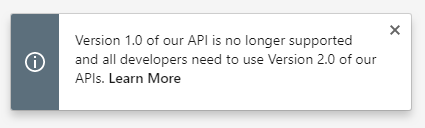
- Ability to post to company pages was moved to Marketing API. Access to Marketing API requires additional review/approval from LinkedIn.
- New app permission w_member_social replaced w_share.
What does it mean for you? What should you do?
1. First of all, update plugin. SNAP version 4.3.6 is fully compatible with all those changes. Earlier versions will give errors like “This resource is no longer available under v1 APIs”.
2. If you were using V1 API, plugin will automatically upgrade you to V2.
3. No matter what API version you were using, you need to re-authorize the plugin. Since posting permission name changed from w_share to w_member_social, you need a new authorization.
If you already approved for “Marketing API” click “Authorize Your Linked In Account (with Marketing API)” otherwise click “Authorize Your Linked In Account (without Marketing API)” and follow the authorization wizard.
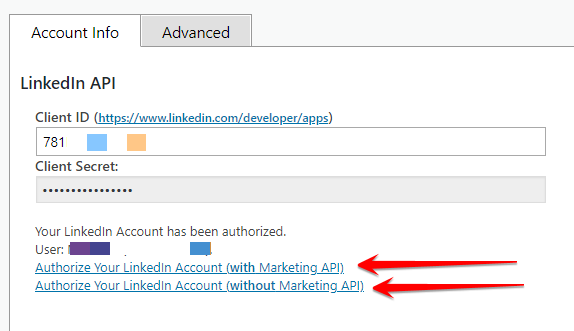
4. If you need to autopost to company page, you need to go t your app on https://www.linkedin.com/developers/ and request an access to Marketing API in the “Products” section. Click “Add More Products” and check “Marketing Developer Platform” there,
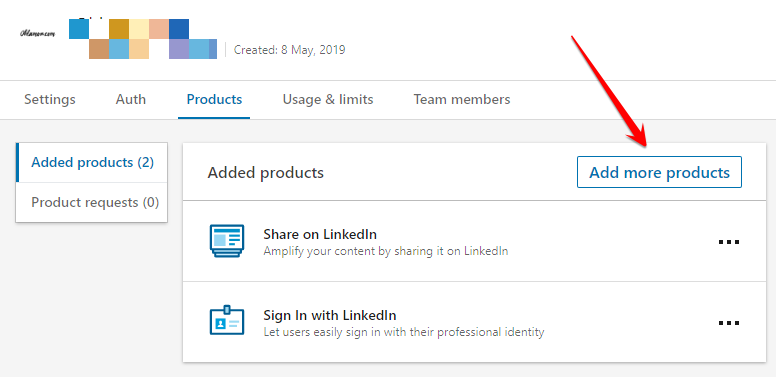
You will receive an email with form that you will need to fill and then in several days you will receive an approval for it. After that you can come back to plugin and click “Authorize Your Linked In Account (with Marketing API)”.
Official Facebook API is now restricted.
Exactly 6 months ago (August 1, 2018) Facebook closed unrestricted access to its official API.
Several hours later they backed down and gave all API users 6 more months to obtain app approvals.
Six months passed and, as promised, today (February 1, 2019) they closed unrestricted access to its official API again. Looks like this time it will stay closed. From now on, only approved apps will be able to autopost.
If you try to post to Facebook with unapproved app you will get this error:

There are two options.
1. Get your app reviewed and approved for auto-posting.
2. Get NextScripts Premium API that is not using Facebook official API and does not require any reviews and approvals.
More info about what happened with Facebook.
Support for "Google My Business" is coming soon...
Support for “Google My Business” is coming this fall.
Google recently made some kind of blog-a-like functionality available for local business listings. As a local business owner you can add posts, events, offers as well as products to your business listing. Although you must have a confirmed “Google My Business” listing we got a lot of requests for this functionality to be added to SNAP.
Google has some kind of officiall native API for “Google My Business”. However it is limited in functionality and it is almost impossible to get an access to it.

We made our own API and we are currently testing it. Next release of SNAP will support an ability to make posts (with image and link). Posting of events, offers and products will follow later.
