
New Release: Version 2.6.1
The new version 2.6.1 has been released. It has better interface, DreamWidth support, ability to auto-import comments from social networks and may other improvements and bug fixes.
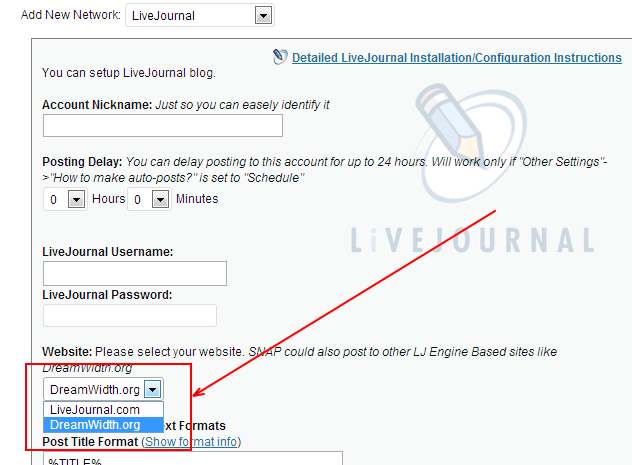
1. DreamWidth. Technically DreamWidth is running on the modified LiveJournal engine, so it was logical to add a support for it. Just click “Add new Network”, select Livejournal from the list and then choose DreamWidth as the website to post
2. Import Facebook comments and post the to WordPress.
a. Go to the SNAP Settings->Other Settings and activate “Comments Import”.
b. Go to the Facebook account settings and activate this feature for each account.
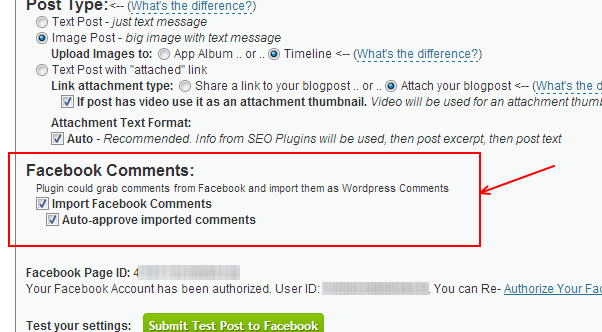
Plugin will check hourly for new comments and automatically import them and add to your posts as WordPress comments. You can also click the “Import Comments” button to get them manually.

3.
Full list of changes.
= 2.6.1 [02/01/2013] =
* Bug fix – Critical bugfix for Facebook Authorization.
* Bug fix – “Import comments” interface tweaks.
* Bug fix – “Add new network” interface tweaks.
= 2.6.0 [01/31/2013] =
* New – Ability to auto-import Comments from Social Networks and post them as WP Comments (Facebook only so far)
* New/Improvement – New Settings Interface
* New – New network (kind of): DreamWidth.org – LJ Based Website
* New – Additional URL Parameters
* New/Improvement – Plugin will invoke it’s own cron in case of broken WP Cron.
* Bug fix – vKontakte – NXS API Fixed.
* Bug fix – Pinterest – fixed “board retreive” that could break the settings.
* Bug fix – Pinterest – fixed “0” board ID problem.
* Bug fix – Pinterest – fixed problem with wrong default image.
* Bug fix – Plurk – Better error handling.
* Bug fix – Fixed broken posting to selected categories only.
* Bug fix – Account assigned categories were not saved.
* Many other minor bug fixes and improvements
Delicious API is broken - Jan 30, 2013
Delicious API is broken today Jan 30, 2013. It looks like the “New Delicious” update messed up with ability to post links through the API.
There are many reports on Twitter confirming that outage is general:

We are monitoring the situation, but can’t do anything about that at this point.
New Release: Version 2.5.2
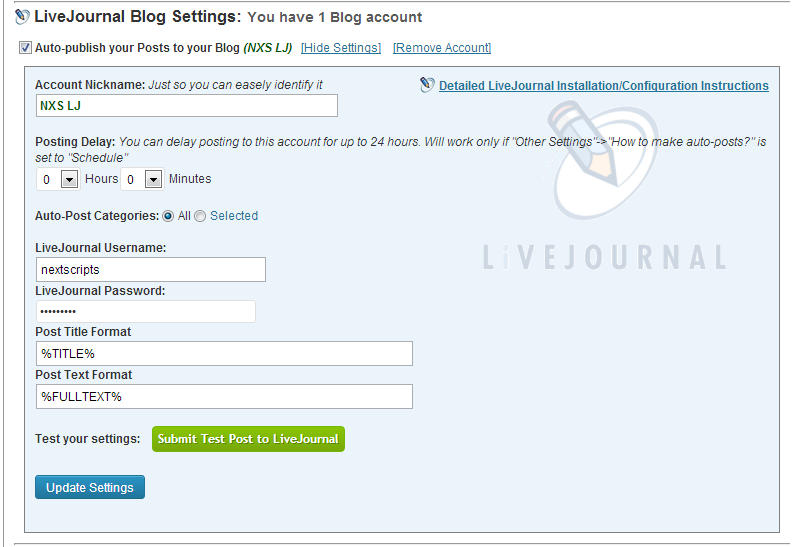
The new version 2.5.2 has been released. It has several important bug fixes, better YouTube and Vimeo videos handling and support for new network: LiveJournal
Full list of changes
= 2.5.2 [01/08/2013] =
* Bug fix – Critical Facebook posting issue.
* Bug fix – Critical Stumbleupon posting issue.
* Bug fix – Tumblr and SU were not taking settings from the “Edit” page
* Bug fix – Post/Don’t Post checkboxes issues.
* Bug fix – Twitter – incomatibility with url_f_open set to off.
= 2.5.1 [01/06/2013] =
* New – New network: LiveJournal. Repost your blogposts to your LiveJournal account.
* New/Improvement – Facebook – support for Vimeo videos
* Improvement/Bug fix – Facebook – better handling of videos in the post.
* Bug fix – Import was button broken on some sites
You can download it from NextScripts or directly from WordPress.org
New Release: Version 2.5.0
The new version 2.5.0 has been released. This release includes several “most requested” pieces of functionality.
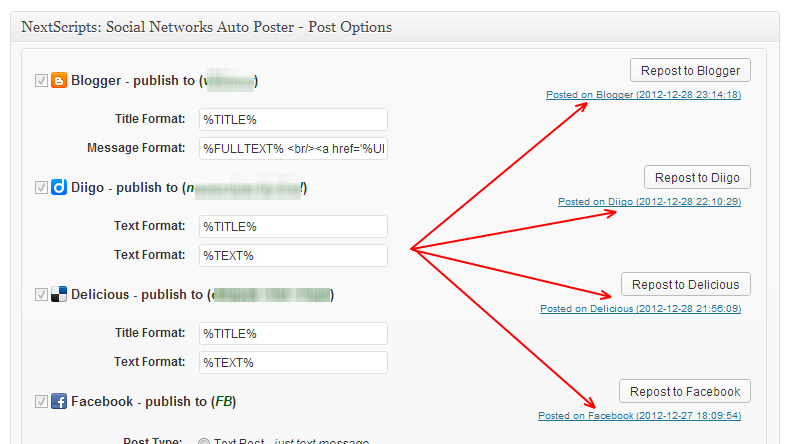
– Direct links to the published posts from the “Edit” page:
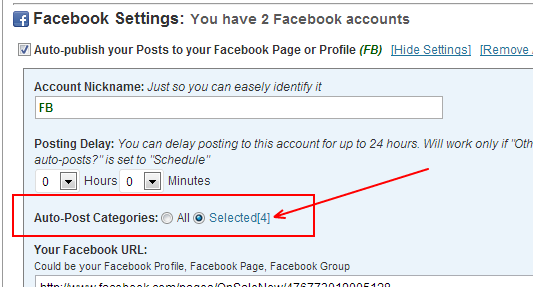
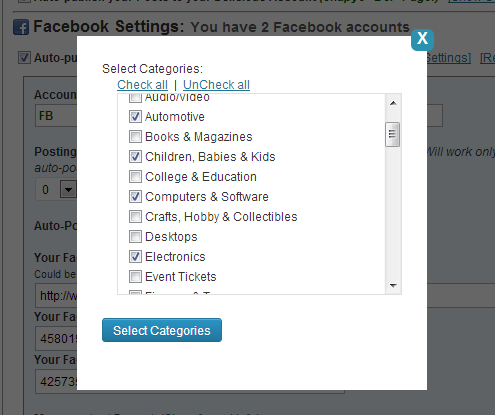
– Ability to assign categories to each Social Network. This network will be auto-selected only when post assigned to specified categories.
– Choice of uploading images to the default “App” album or to the special “Timeline/Wall” album. (see more here)

Full list of changes
= 2.5.0 =
* New/Improvement – Direct links to posts in the “Edit” page.
* New/Improvement – Pinterest – ability to “Pin” videos.
* Improvement – Facebook – Photos could be posted to the App Album or to the “Wall” album to avoid grouping
* Improvement – if post has video and no images, video preview image will be used.
* Improvement/Bug fix – Fixed incorrect image checking against websites blocking HEAD request.
* Improvement/Bug fix – support for “attached” but not “featured” images.
* Bug fix – Facebook – broken “image” post if post has video.
* Bug fix – Plurk was not taking settings from the “Edit” page
* Bug fix – Blogger (Free API) iframe was breaking autoposting
You can download it from NextScripts or directly from WordPress.org
SNAP: Facebook "Image" post feature.
Since version 2.5.0 you have a choice of uploading images to the default “App” album or to the special “Timeline/Wall” album.
App Album: Facebook automatically creates an album for your app with the same name as your app name. If you post images frequently Facebook will group them as in any regular album.
Timeline/Wall: Images will be posted to the special “Wall/Timeline” album and won’t be grouped even if posted frequently. The only tricky part here is that Facebook does not create “Wall/Timeline” album automatically. This album gets created only when first image posted to timeline manually. You need to go to your Facebook Account/Page/Group and upload one image to timeline before selecting this option.
If “Wall/Timeline” does not exist, images will be posted to the “App Album” even if “Wall/Timeline” option is selected.
Thanks to the plugin user “Leon Ho” for contributing to this functionality.
New Release: Version 2.4.8
The new version 2.4.8 has been released. It has some bug fixes for Pinterest, StumbleUpon and Twitter
= 2.4.8 =
* New/Improvement – external jQuery reference removed.
* Bug fix – Pinterest board selection fix.
* Bug fix – StumbleUpon connection fix.
* Bug fix – Twitter %TAGS% and %CATS% for non English characters
* Bug fix – Twitter %TAGS% and %CATS% were not found in the text sometimes.
* Bug fix – WordPress better handling of connection errors.
* Bug fix – Post status saving.
= 2.4.7 =
* New/Improvement – Ability to change format before reposting when you edit post.
* Bug fix – Critical Blogger “Function not found” fix.
* Bug fix – Escaped quotes in Message Format.
You can download it from NextScripts or directly from WordPress.org
New Release: Version 2.4.6
The new version 2.4.6 has been released. Some improvements include support for Plurk, hashtags for Twitter, support for WordPress Built-in Shortener and numerous bug fixes.
= 2.4.6 =
* Improvement – WordPress 3.5 compatibility
* Improvement/Bug fix – Better image handling.
* Bug fix – Broken URL Shortener Selection.
* Bug fix – Fixed LinkedIn for European accounts.
* Bug fix – Twitter Message length tweaks.
= 2.4.5 =
* Improvement/Bug fix – Google+ better “Post type” selection.
* Bug fix – Google+ – image uploads for pages go to the right album, not profile.
* Bug fix – Google+ – Correct image for “attached” posts
* Bug fix – Twitter image attachement broken in 2.4.4
= 2.4.4 =
* Improvement – Twitter – If tags and categories are alredy in the text will become hashtags, not duplicates.
* Improvement/Bug fix – “Check All/Uncheck All” links now have prioraty over category selection.
* Bug fix – Blogger – broken messages.
* Bug fix – Plurk – 180 characters limit.
* Bug fix – Twitter correct characters count (119) for “Posts with image”
= 2.4.3 =
* New – Support for WordPress Built-in Shortener
* Improvement/Bug fix – Facebook – better image posting.
* Bug fix – Blogger Error “Attribute name associated with an element type “####” must be followed by the ‘ = ‘ character
* Bug fix – Blogger taking over the WP Admin after the error.
* Bug fix – Blogger “Invalid JSON” Error
* Bug fix – Plurk Error “Call to undefined function http_build_url()”
* Bug fix – LinkedIn “We were unable to post your update” error.
* Bug fix – Pinterest UTF characters in the Board names.
* Bug fix – Pinterest – better Handling of Error 502.
= 2.4.2 =
* New – New network: Plurk. share your new blogpost on your Plurk account.
* New – Twitter – ability to post tags and categories as #hashtags
* Improvement – Facebook settings screen shows what URL and Domain use for App Configuration.
* Improvement – Facebook –
will add a line break for “Facebook Message text Format”
* Bug fix – SSL connections fix and SSL cerificate update
* Bug fix – Broken URL Shorthener selection
= 2.4.1 =
* Bug fix – Twitter error if attachmet image is missing
* Bug fix – Issue with apostrophees and quotes
* Improvement – “Click-through URL” for the Tumblr “Photo” posts can use shorthened URLs.
* Improvement – Ability to select custom field instead of the featued image.
You can download it from NextScripts or directly from WordPress.org
New Release: Version 2.4.0 - Facebook and Twitter "Photo" Posts
The new version 2.4 has been released. It has some big improvements to the Facebook and Twitter. It ads ability to make “Photo” posts to Facebook and “attach” images to Twitter posts. It also adds support for two more URL shorteners – bit.ly and wp.me.
Release has several bugs and better support for qTransalte and non-English characters.
= 2.4.0 =
* New – Facebook “Photo” posts.
* New – Ablity to attach image to Twitter posts
* New – Bit.ly support for short link.
* New – wp.me support for short links. (Jetpack users only)
* Improvement – “Click-through URL” for the Tumblr “Photo” posts.
You can download it from NextScripts or directly from WordPress.org
Google+, 2-step verification and auto-posting.
Plugin could not be compatible with two-step verification. Plugin have to login to your account in order to make a post. 2 step verification requires entering the code from your phone. Plugin can’t take a look at the screen of your phone each time it needs to make a post, so it’s not possible for it to login like this.
Also plugin could not be compatible with “application specific passwords”. Application specific passwords could be used only in the non-browser applications, but Google+ is accessible by browser only.
If you are concerned about your personal Google account and want to keep 2 step verification on, just create another account, make it admin for your Google+/Blogger page and use it for auto-posting.
UPD: Link to “Owners and managers on Google+ Pages” – https://support.google.com/business/answer/4573962
UPD2: There are no “workarounds”. The whole idea of two-step verification is to prevent an access to your account from anybody without your phone in the hand. What would be the purpose of such protection if you can go around it?
New way to upgrade to "Pro"
Yesterday WordPress temporarily took down our plugin page from it’s repository for the guidelines violation. The reason was the way we were doing “Upgrade to Pro”. We made it that way for your convenience, but we need to follow WordPress guidelines. Another step will be required to get the upgrade from now on. We will try to make the transition as smooth as possible, but some of you might loose the “Pro” functionality with the 2.4.0 and 2.4.1 updates.
Here is what needs to be done to restore the “Pro”.
1. Visit https://www.nextscripts.com/mypage and download new “NextScripts: SNAP Pro Upgrade Helper” plugin.
2. Install and activate “NextScripts: SNAP Pro Upgrade Helper” plugin. Please see installation instructions if you are not sure how to do it.
3. Most probably step #2 will restore your “Pro” features, if not re-Enter your “Activation Key”.
If you still don’t see “Pro” features please contact support we will help you on the priority basis.
We apologize for the inconvenience, but this is necessary step in order for us to keep the plugin.
.
