

Forum Replies Created
- AuthorPosts
Here is a screenshot from OUR tutorial:
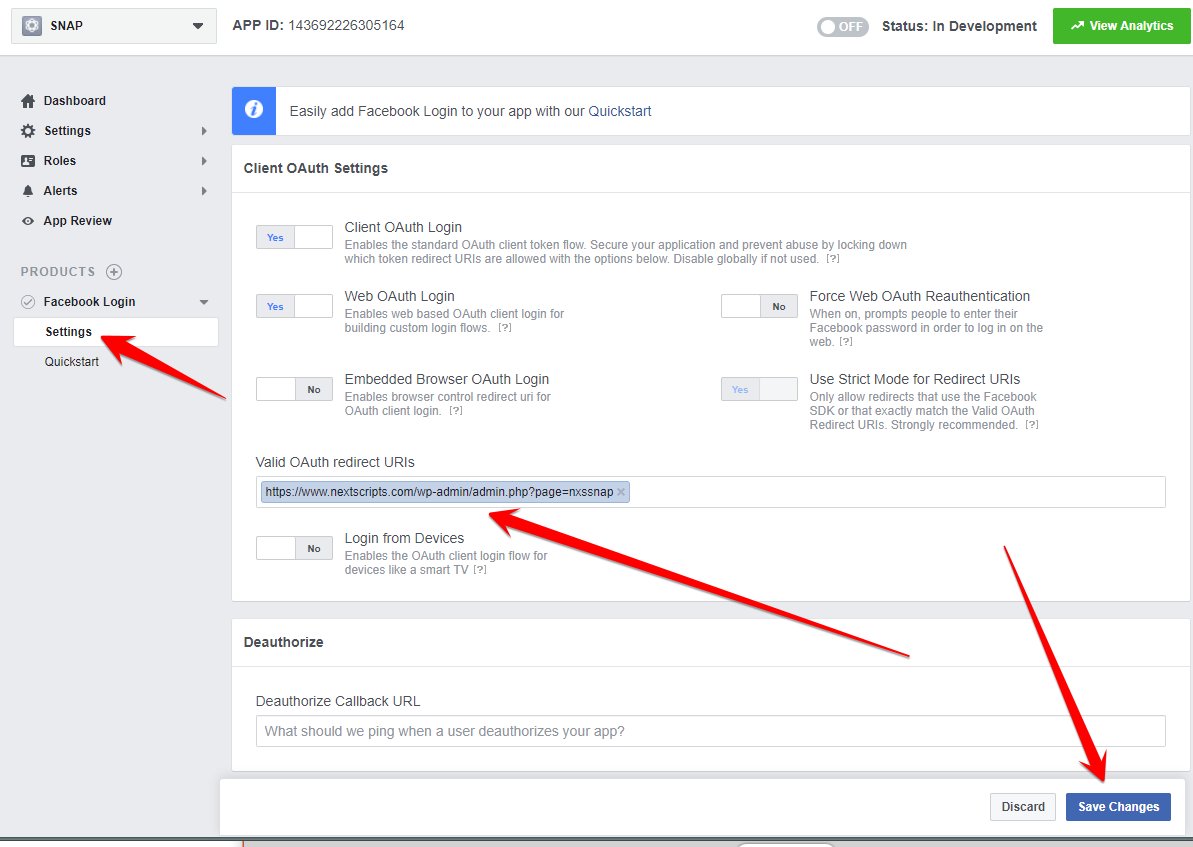

As you can see it set to “Yes”.
Facebook is tightening its security. Right now you can still use an older app with strict mode set to NO and incorrect URL, but they will disable it soon, so its better to setup it correctly.
Why exactly are you trying to select NO for Use Strict Mode for Redirect URIs?
Please just follow our very detailed and illustrated with many screenshots step-by-step instructions:
We really don’t have an answer for this yet.
Technically session is valid for 6 months. But it also looks like that each post extends it for 6 months from the time of that post.
So if you don’t do any posts for 6 months it will expire. Otherwise it should stay active forever.
That’s a theory. Reality could be different.
We just released plugin plugin version 4.1.5 and API version 4.2 (Please go to the Help/Support page and click “[Check for API Update]”).
It comes with support for alternative Flipboard configuration.
If you are getting this error please try it: https://www.nextscripts.com/instructions/alternative-flipboard-configuration/
You need to be logged to the account with active order for Instagram API.
Well, JavaScript is broken on your site. Our plugin is just using the broken part somewhere earlier then usual causing your visual effects.
If you like I can take a look at your environment. Please open a support ticket with your site details.
- This reply was modified 8 years, 6 months ago by
 NextScripts.com.
Please see the answer in the FAQ – #1.10:
Could you please explain in details or provide some scrrenshots about your issues?. What exactly does it mean ” interfers with the WPBakery Visual Composer” or “Screen Options’ at the top of the screen is broken”? Interferes how? Broken how? Thank you for your interest to our products.
Also please lease take a look at your debug console in any browser for Javascript errors.
It sounds like you have Javascript broken on your site. Please take a look at your debug console in any browser for Javascript errors.
As it stated in the instructions, you MUST have enough Reddit Karma points to be able to post to Reddit.
Once you reach necessary karma level Reddit will remove captcha and you will be able to autopost.
Do you mean so say that SNAP made images in the “Add Plugin” section disappear?
It sounds like you have Javascript broken on your site. Please take a look at your debug console in any browser for Javascript errors.
Please see today’s update at https://www.nextscripts.com/instructions/instagram-issues/
Could you please explain what exactly do you mean?
You can upgrade to 4.1.2 from your WP Admin Panel->Dashboard -> Updates or manually from https://wordpress.org/plugins/social-networks-auto-poster-facebook-twitter-g/
Are you getting any errors?
Please publish a new post, than check your Log/History page and let me know what do you have there.
- This reply was modified 8 years, 6 months ago by
- AuthorPosts




