

Forum Replies Created
- AuthorPosts
If you go to “Edit Post” page you will see “Repost” buttons in the plugin box.
You need to select “NextScripts API” from the dropdown to see the fields
 easyParticipant
I also have problem with StumbleUpon
Array ( [pgID] => [isPosted] => 0 [pDate] => 2015-09-17 03:17:31 [Error] => Error – Array ( [0] => Array ( [message] => This webpage is not available. Please try another page. [code] => -1000000 [struct] => discovery\Discovery [type] => reason [meta] => Array ( ) ) [NXS_FIELDS] => Array ( [_token] => c68083332d97302aa7be22710b957ef9 [_action] => submitUrl
BBCode you used is not allowed.
=>
Fixed in 3.4.24
Fixed in 3.4.24
John HenryParticipantWas afraid of that, but thank you for confirming. Also, thanks for creating easily the best money I’ve spent on a website tool, ever. This is a seriously great plugin, and I’m eagerly looking forward to v4!
PiotrParticipantAhh, now I understand! It took me a few minutes to figure it out but I am using the wrong API! I need to buy the premium API, thanks!
JayParticipantPHP Version: 5.3.28; Memory limit: 256 MByte; Memory usage: 19.35 MByte
So it is not a timeout issue, and I also deactivated all the plugins except nextscript and its helper, still received the same error. It was working fine before I update the plugin.
Any idea where I should look next? Because I want to add a few more social networks, and now I can’t.
We haven’t tested it with PHP7. We think it’s way too early to do that. People just stopped using php3 and we are still getting complains that our code is not compatible with PHP4.
PHP 7 is still beta/RC. We will wait at least until the final release.
What exactly did you enter in the “Your LinkedIn Page URL” field?
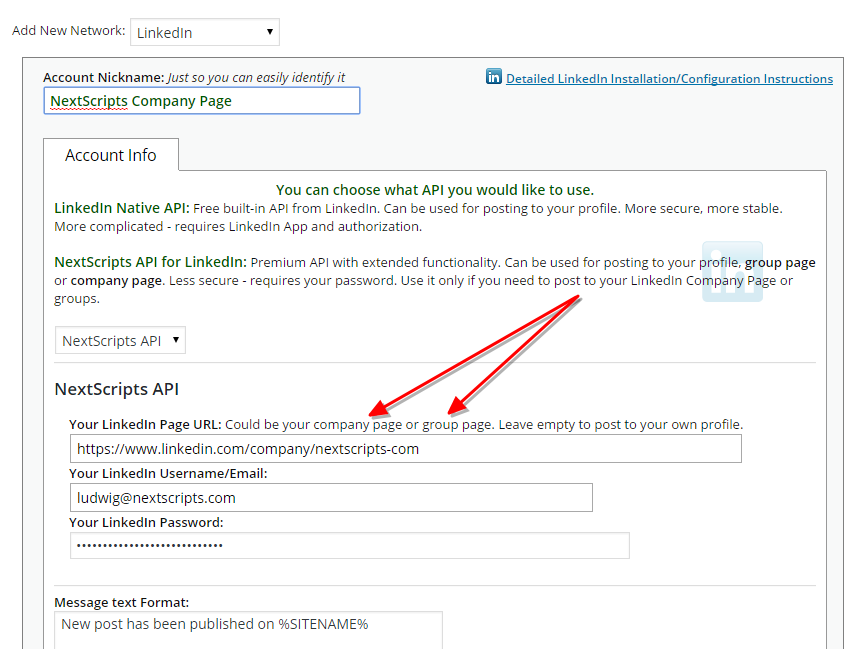

Upcoming Version 4 will support that.
September 13, 2015 at 3:17 am in reply to: Illegal String Error after submitting new blog post / forum post (bbpress) #459699CarlosParticipantI am seeing the same issue specifically for Google+ posting for the updated plug-in.
Support – How can this issue be fixed?
Kevin LoganParticipantI think I have the same issue. Would love to hear how
September 9, 2015 at 11:02 pm in reply to: SNAP Error – Server can't access it's own images – logo3w.png #458957James WinstanleyParticipantI’ve solved this issue. If you are hosting the website yourself, you will need to resolve the hostname locally.
On windows:
Windows -> System32 -> drivers -> etc -> hosts
add your local ip, followed by the hostname:
192.168.***.*** example.com
This will allow the plugin to resolve the host locally, instead of trying to contact the DNS server and getting confused since the destination is hosted locally.
September 9, 2015 at 3:37 am in reply to: Illegal String Error after submitting new blog post / forum post (bbpress) #458830JavierParticipantHello,
I have the same problem.
- AuthorPosts




