NextScripts.com

Forum Replies Created

Viewing 15 posts - 2,311 through 2,325 (of 3,474 total)
  • Author
    Posts
  • in reply to: NextScripts WordPress Plugin triggers a fatal error #133356
    NextScripts.com
    Participant

      Duplicate to: https://wordpress.org/support/topic/version-323-upgrade-triggering-a-fatal-error

      in reply to: ISSUE – Auto-publish to Facebook #133333
      Georged
      Participant

        How did you solve this. I have the same problem as you

        [pgID] =>
        [isPosted] => 0
        [pDate] => 2014-02-06 10:19:24
        [Error] => [ERROR] An unknown error has occurred.

        in reply to: Problem with latest version 3.2.3 #133112
        Matt
        Participant

          OK, that seems to have been the problem. Prior to version 3.2.3, I had it activated on each subsite, not network activated.

          Network activating it caused me to have to re-enter my SNAP Activation key and everything seems to be fine now.

          in reply to: Filter auctions to be posted #133088
          CTT
          Participant

            Anyone?

            in reply to: Problem with latest version 3.2.3 #133085
            NextScripts.com
            Participant

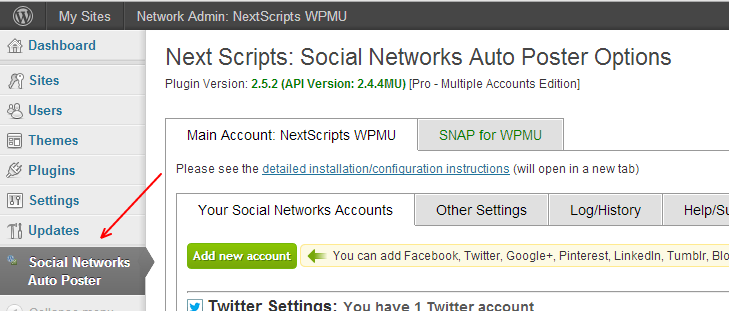
              You can’t have SNAP activated on the subsites. SNAP always MUST be “Network Activated”. SNAP has it’s own management for subsites.

              There is a main SNAP panel in the Super Admin Dashboard: (wp-admin/network/admin.php?page=NextScripts_SNAP.php)

              You can see in on this screenshot: https://www.nextscripts.com/images/sc/install-0045.png

              in reply to: Problem with latest version 3.2.3 #133084
              Matt
              Participant

                Please note this is the Social Networks Auto Poster PRO for WordPress Multisite (WordPress MU) plugin I’m talking about if that makes a difference.

                in reply to: Problem with latest version 3.2.3 #133075
                Matt
                Participant

                  I’m not sure what you mean? I’m logged in as a super admin.

                  And I only have SNAP activated on subsites.

                  Is there anyway I can simply roll back to a previous version?

                  in reply to: Facebook, "internal server error", and "admin-ajax.php" #133035
                  NextScripts.com
                  Participant

                    The answer is in the FAQ – #4.4:

                    Support FAQ


                    in reply to: Double FB Posts #133034
                    NextScripts.com
                    Participant

                      You have cron racing.

                      Please see here: https://www.nextscripts.com/known-issues/auto-reposting-problems/

                      in reply to: Problem with latest version 3.2.3 #133012
                      NextScripts.com
                      Participant

                        What do you see in the SNAP panel in your SUPER Admin dashboard?

                        in reply to: Double FB Posts #132727
                        Jimmy Harmon
                        Participant

                          Should I put in a support ticket? I thought we could do it through the forums, but I haven’t received much response.

                          in reply to: Facebook, "internal server error", and "admin-ajax.php" #132690
                          boah123
                          Participant

                            I’ve been able to obtain more info!

                            The 500 error code said:
                            “Invalid or no certificate authority found, using bundled information”.

                            I’ve tried to re-authenticate and got this message:
                            -= This is normal technical authorization info that will dissapear (Unless you get some errors) =-

                            Array
                            (
                            [http_request_failed] => Array
                            (
                            [0] => SSL certificate problem, verify that the CA cert is OK. Details:
                            error:14090086:SSL routines:SSL3_GET_SERVER_CERTIFICATE:certificate verify failed
                            )

                            )
                            -=
                            Array
                            (
                            [doFB] => 0
                            [nName] => mydomain.com
                            [fbAppID] => xxxxxxxxxxxxxx
                            [fbAppSec] => xxxxxxxxxxxxxxxxxxxxxxxxxx
                            [catSelEd] =>
                            [fbPostType] => A
                            [fbAttch] => 2
                            [fbAttchAsVid] => 0
                            [imgUpl] => 1
                            [fbMsgFormat] => %TITLE%
                            [fbMsgAFrmt] =>
                            [fbURL] => https://www.facebook.com/mydomain.com
                            [fbPgID] => mydomain.com
                            [fbAppAuthToken] => xxxxxxxxxxxxxxxxxxxx
                            [fbAppPageAuthToken] => xxxxxxxxxxxxxxxxxxxxx
                            [fbAppAuthUser] => xxxxxxxxxxxxxxxxxxxxxxxx
                            [catSel] => 0
                            [riComments] => 0
                            [riCommentsAA] => 0
                            [useFBGURLInfo] => 1
                            [rpstOn] => 0
                            [rpstDays] => 0
                            [rpstHrs] => 2
                            [rpstMins] => 0
                            [rpstRndMins] => 15
                            [rpstPostIncl] => 0
                            [rpstType] => 2
                            [rpstTimeType] => A
                            [rpstFromTime] =>
                            [rpstToTime] =>
                            [rpstOLDays] => 30
                            [rpstNWDays] => 365
                            [nxsCPTSeld] => a:1:{i:0;s:4:”post”;}
                            [rpstBtwDays] => Array
                            (
                            )

                            )
                            Array
                            (
                            [headers] => Array
                            (
                            [access-control-allow-origin] => *
                            [cache-control] => no-store
                            [content-type] => application/json; charset=UTF-8
                            [expires] => Sat, 01 Jan 2000 00:00:00 GMT
                            [pragma] => no-cache
                            [www-authenticate] => OAuth “Facebook Platform” “invalid_code” “This authorization code has been used.”
                            [x-fb-rev] => 1114696
                            [x-fb-debug] => qCht7rtw/aYImXyqxDR2vZjmSf+8UJ5kQL1ZLubG4Po=
                            [date] => Sun, 09 Feb 2014 11:02:54 GMT
                            [connection] => close
                            [content-length] => 97
                            )

                            [body] => {“error”:{“message”:”This authorization code has been used.”,”type”:”OAuthException”,”code”:100}}
                            [response] => Array
                            (
                            [code] => 400
                            [message] => Bad Request
                            )

                            [cookies] => Array
                            (
                            )

                            [filename] =>
                            )

                            After that, the test post on my Facebook page did work. I can also report to Facebook. However, the message “Sending update to Facebook” remains visible. As is the error message via Ajax in the browser (500 error).

                            So, on one had it is working and on the other hand it is not working how is suppose to be.

                            Any hints?

                            in reply to: Filter auctions to be posted #132686
                            CTT
                            Participant

                              Any response please?

                              in reply to: Facebook, "internal server error", and "admin-ajax.php" #132467
                              boah123
                              Participant

                                Inside my post, I used my domain name. Could you please anonymise my second url to ‘mydomain’. TNX.

                                in reply to: Facebook, "internal server error", and "admin-ajax.php" #132466
                                boah123
                                Participant

                                  So far I can’t find a logfile with an error.

                                  Inside this it goes wrong.

                                  Initiator:
                                  https://www.mydomain.com/wp-admin/load-scripts.php?c=1&load%5B%5D=jquery-core,jquery-migrate,utils,plupload,plupload-html5,plupload-flash,plupload-silverlight,plupload-html4,json2&ver=3.8.1

                                  https://www.mydomain.com/wp-admin/admin-ajax.php

                                Viewing 15 posts - 2,311 through 2,325 (of 3,474 total)